Friday, August 22, 2014

Your First Resume

Interviewing for a job can be a scary proposition. You don't know what to expect. Are you going to get some crazy questions? Will you be interrogated with bright lights? It can get a little nuts.


You don't have control of how you interview will go but you do have control over how you present yourself. Part of presenting a professional image is creating a resume. In your resume, you want to tell a story, your story. You want to craft your story to show how your life and your choices have prepared you specifically for the position to which you are applying. Think about the choices you've made, the classes you take, the sports you participate in. What do those choices say about you, your judgement, your drive, and your work ethic? Consider how you want to present yourself before you begin crafting a resume. Also, consider what a potential employer might want in an employee. Do some research. What positions have they had trouble filling. What skills do they need in an applicant. Is it a good "fit" for both of you? Once you have the answers to those questions, you'll be ready to create a quality resume.

Web Resources:

Forbes Article

Elements of a resume

What makes a good resume great?


Day 1: For the first day, we'll go over some general questions you might have about the job application process. Write a question on the board. We'll work together to research the answers. Next we'll select 5 qualities or characteristics that describe who we are.

Assignment: Create and share a folder on your Google Drive called "Resume Project." Write a new document called Personal Characteristics listing five characteristics of your life or personality. Write a summary sentence or two providing evidence for each characteristic. Evidence can include work experience, school studies, extracurricular activities such as clubs or sports, or church activities. Submit the document via your shared folder by the end of class.

Day 2: Believe it or not, Human Resources Directors (HRs) are real people just like you. And just like you, they have a job to do. They are approached by company managers who need qualified workers to fill positions within their companies. Why do they have positions to fill? There could be many reasons, perhaps the last worker was fired for not doing a good job or being chronically late or absent. Perhaps the company is growing and the company needs to expand their capabilities. Perhaps they are looking for someone with a particular skill (like being bi-lingual).

Assigment: Below are five job descriptions for entry evel jobs. Select one of them and write a list of five characteristics that would be needed in a job applicant. Be specific with what qualifications would be needed for the job. Consider other characteristics as well. Create a Google Doc, title it Job Description, enter the 5 characteristics for one of the jobs and submit it via you Resume Project folder that you have already shared.

1. Sales Clerk - Sporting Goods Store

2. Doctor's Office Receptionist

3. Assistant Chef - Local Restaurant

4. Assistant Computer Technician

5. Child Care Worker - Local Daycare Center


Day 3: Today is the day that we put everything together. Select one of the five opening positions posted from the previous day. I'll list five characteristics or qualifications the HR director is looking for in each applicant. Craft your resume to show that you are the best applicant for that particular job. I'll provide you a template but you'll have to fill in the resume with your own unique data. You can find the template in a folder here

https://docs.google.com/document/d/1I2fqmb8DGg63nRiI4bMvWG_XS7QAG8SXPZdov4x4Ox8/edit?usp=sharing.

 Place your resume into the Resume Project folder. You'll be graded on the completeness and effectiveness of your resume. Watch for grammatical or spelling errors which could derail your resume. Good luck!

Wednesday, August 20, 2014

Using Hyperlinks

One of the most useful aspects of a document is being able to create links to other more in-depth information. The links, called hyperlinks allow you to turn words into clickable links to web sites.

Here's a quick tutorial on how to create hyperlinks.


Assignment:

Create hyperlinks in your information sheet on sexting. Here are the links that you'll create:

Sexting Definition - en.wikipedia.org/wiki/Sexting
TBI - http://www.tbi.state.tn.us/
Sex Offender Registry - http://www.tbi.state.tn.us/sex_ofender_reg/sex_ofender_reg.shtml

1. Create a new folder on your Google Drive called Hyperlinks.

2. Open the Droid Serif file in your Type Test folder, make a copy and place it in the Hyperlinks folder you just created.

3. Place the links in the following locations in the document:

  • Sexting Definition -  Place this link in the word "Sexting" in the header of the first paragraph.
  • TBI - Place this link in the word "crimes" in the first line of the second paragraph.
  • Sex Offender Registry - Place this link in the words "sex offender" at the end of the second paragraph.
After placing these links, save the file and share the folder (manersj@k12tn.net.).

This project is worth 10 points and will be graded on technical accuracy. All the links must work properly.  All work must e completed by the end of class! Please make sure that your link arrives at the instructor's computer before you leave.


Sunday, August 17, 2014

Translating Documents

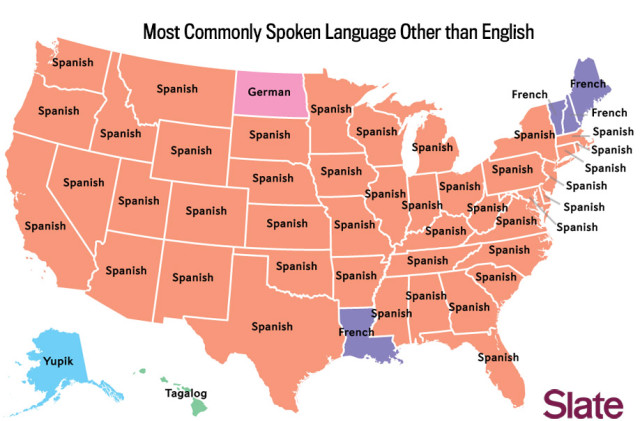
Here is a map of the most commonly spoken languages spoken in the United States. Do any of these surprise you?How would you feel if you lived in a country where your native language was not spoken?


So now that you know that not everyone speaks English fluently, how can you translate your documents into another language? Google Docs has an easy solution.


Now you're ready to try it yourself.

Assignment:

For this assignment, your translate your three sexting information sheets into three different languages: Spanish, French and German. Follow these steps carefully:

1. Create a new folder on your Google Drive called "Translation."

2. Open each of your Picture Test documents, make a copy and save each into the Translation folder you just created.

3. Next, you'll highlight the text of each document and translate the each document, one into French, one into Spanish, and one into German.

4. After you're done, share your folder with your instructor by right clicking on the folder, select Share and type your instructor's e-mail in the window at the bottom.

Make sure you have 3 completely translated documents when you're done. All work must be submitted by the end of class. This project is worth 10 points. You will be graded on completeness, and neatness. (You may have to reduce the type size a bit if the document goes over a page.)

Using Photos

Photos can enhance your presentation by giving the reader a visual representation of what you are writing. Below are three pictures that will work with your information paper on sexting laws in the state of Tennessee. We will use these pictures to enhance the documents we created in the last lesson. This lesson must be completed in class.


Assignment: 

1. Create a new folder on your Google Drive. Label the folder Picture Test.

2. Copy each of the three documents into the folder. To do this, open each of the three Type Test files, make a copy (File> Make a Copy), Then move the copy to the Picture test folder (File>Move> Select folder).

3. Download the three pictures to your hard drive by right clicking each one (Save Image As> Save to your Downloads folder). Place one picture in each of the three documents (Insert>Image> Upload). You must use a different picture for each document.

4. Click on the picture, select Wrap Text. Use 1/8" setting. and place the image in the document so that the text is readable. Also, do not make the picture so large as to flow the text into a second page. The document must be one page in length. The picture should not be more than 3" x 4".

5. Save all three documents in the folder and share the folder with your instructor via e-mail (manersj@k12tn.net). To do this right click on the folder and select Share, then enter the e-mail address at the bottom of the window. Don't forget to select Share and Send (the blue button) when you send.

This entire project is worth 10 points. You'll receive 3 points for each completed document plus a bonus point for completing all three documents.  Make sure that your e-mail arrives before you leave class! Late work will not be accepted.


Friday, August 15, 2014

Google Drive

Here's a quick video on the new Google Drive. This will give you a quick overview of how Google Drive works on multiple devices.


Understanding Type


Ever thought about the important role that type plays in our everyday lives? Listen to Apple founder, the late Steve Jobs, describe the influence of type on the design of Apple products.


Discuss: What role did type play in making the Macintosh a success? How did the Macintosh influence all personal computers? Why is type important?

Read the main page on this site for a good introduction to type and the history of type.

Watch this video on a brief history of type.


Type has even led to a political scandal which led to the downfall of a once famous news anchorman. You can read about the controversy here.

Assignment:

You'll be creating an information sheet on "sexting" laws in the state of Tennessee. You'll create 3 versions of the sheet and save them to a folder on your Google Drive. Carefully follow the instructions below.

Step 1. Create 3 documents in Google Docs. Label the documents Serif, Sans Serif and Display. Copy the text below into each document. (Highlight and use Cntrl+C for copy, and Cntrl+V for paste).

Laws Pertaining to Sexting in the State of Tennessee
Currently, in Tennessee anyone - regardless of age - who creates, distributes or possesses an image of a minor engaged in a sexually explicit act may be prosecuted under the State’s child pornography laws and if convicted, will generally be required to register as a sex offender.


Legislative Summary
Tennessee has not created a separate statute for sexting crimes. Therefore, a minor who is caught creating, distributing, or possessing a sexually explicit image of another minor could be charged under the State’s child pornography statutes. If the minor is convicted of a felony they will generally be required to register as a sex offender.


Law and Punishment
In general, under Tennessee law it is a felony to either:
Knowingly possess any material of a minor engaged in a sexual act.
Anyone caught can be charged separately for each item found that contains a minor engaged in a sexual activity.
If convicted, an individual could face up to 12 years in prison and/or a fine of up to $5,000. The penalty increases if a person is caught with more than 50 items and increases again if caught with more than 100 items.
Knowingly promote, sell, distribute, transport, purchase or exchange material, or possess with the intent to promote, sell or distribute any material that contains a minor engaged in a sexually explicit activity.
Anyone caught can be charged separately for each item found that contains a minor engaged in a sexual activity.
If convicted, an individual could face up to 15 years in prison and/or a fine of up to $10,000. The penalty increases to a possible 30 years in prison and/or $25,000 fine, if a person is caught with more than 25 items.
Knowingly use a minor in creating or participate in material that contains a minor engaged in a sexually explicit activity.
Anyone caught can be charged separately for each item found that contains a minor engaged in a sexual activity.
If convicted, an individual could face up to 30 years in prison and/or a fine of up to $25,000.
If convicted of a felony an individual would generally be required to register as a sex offender.

Format each file in the following manner:

Serif - Use 14 point Droid Serif Bold for the headers. Use 11 point Droid Serif for the text. Format the list with numbers.

Sans Serif - Use 14 Point Verdana Bold for the headers. Use 11 point Verdana for the text. Format the list with bullets.

Display - Use 14 point Impact for the headers (no bold). Use 11 point Arial for the text. Format the list with diamonds.

Step 2. Save your 3 documents in a Google Drive folder labeled "Type Exercise" and share it with your instructor (manersj@k12tn.net). To share a folder, right click on the folder and click "sharing." enter the e-mail address of the person you wish to share the folder with at the bottom of the page. Click "done."

You're done!

Analyze: Which of the three do you think is the most readable? How do you think you could improve on these three styles?

Saturday, August 9, 2014

Kred vs Klout vs PeerIndex

For this exercise, we'll be working in groups of 2-4 students. Our goal for this session is to understand social media measurement and how it might influence the future of social media.

Watch this video on Klout.


Read these articles on Kred, Klout and PeerIndex. Take your time and read these carefully.


http://www.govtech.com/e-government/Klout-and-Kred-Scores-Critical-or-Meaningless.html

http://www.forbes.com/sites/scottlevy/2013/03/04/klout-vs-kred-which-if-any-is-better-for-your-business/

http://themediaonline.co.za/2014/08/winning-friends-and-influencing-them/


Discuss your impressions with a group of 2 to 3 fellow students. Express your opinions and listen to others' point of view.

Discussion Starters -

1. Do you think social influence measurement is a good idea or is it a "cancer on social media"?
2. If you knew your conversations were being rated, would it change your behavior?
3. Does social media measurement change the way people behave online?
4. What would you think if a friend recommended a product for you on social media, then you found out that they had received a free sample as a perk?
5. What if you were offered a perk? How would you deal with it?

Assignment:

Write a one page paper in Microsoft Word answering the following questions:

1. What are these companies attempting to do and why?
2. Why are companies interested in their work?
3. What are these companies attempting to understand?
4. How could this data be used by employers?
5. What do you think? Is this good for social media?


Remember, write in complete sentences. Use well written sentences with good punctuation.. Don't use sentence fragments. Don't just present facts. I'd like your opinion as well.

E-mail the document as an attachment to manersj@k12tn.net.

Kred.com
Klout.com